
How Property Managers Can Strengthen a Property’s Digital Presence—and Deliver More Value to Tenants
- Digital Growth, Process & Proof
- October 21, 2026
- 12-minute read
Property managers spend a great deal of time paying attention to the physical condition of a property.
They notice when signage needs to be replaced, landscaping needs attention, an amenity changes, a tenant moves out, or something about the property no longer reflects the standard the management team wants to maintain.
But a commercial property also has a digital condition.
Prospective tenants, brokers, existing tenants, ownership, visitors, vendors, and other stakeholders may encounter the property through search results, listing platforms, websites, leasing materials, maps, photography, directories, emails, and mobile devices.
Those digital touchpoints may be created at different times and maintained by different people.
And just like the physical property, they can become outdated.
A property’s digital presence therefore should not be treated only as a marketing project that is completed once and left alone.
It is an asset that benefits from ongoing stewardship.
Outdated Digital Information Can Create Real-World Friction
I was reminded of this recently while preparing to meet with a property management company.
I went to the office address published on the company’s website and found the location empty. The phone number listed on the site reached a generic, unbranded voicemail, so there was no immediate confirmation that I had even reached the right business.
I eventually found the company’s current location only after specifically searching for evidence that the office had moved.
Fortunately, I was able to connect with the person I was hoping to meet.
During that conversation, we ended up discussing a closely related digital problem: how individual properties could have permanent, company-owned pages within the management company’s existing website rather than relying primarily on external listing links.
The two situations were different, but they pointed to the same underlying issue.
When a business or property changes, the digital record has to change with it.
That experience reinforced something that applies well beyond one company or one website.
A digital presence is only as useful as the information people can actually rely on.
The Digital Property May Be Seen Before the Physical One
For someone considering a property, the first meaningful interaction may happen long before an in-person tour.
A prospect might discover an available space through a commercial real-estate platform, search the property by address, visit a management company’s website, download a brochure, examine photographs, look at a map, or compare the location against several competing properties.
Commercial-property platforms themselves are built around this digital evaluation process, combining property details, imagery, maps, contact information, availability, and other information to help users research opportunities.
That makes the property’s digital presence part of the leasing experience.
It does not mean a polished website or better photography automatically results in a signed lease.
It means a prospect should be able to understand what the property is, where it is, what is available, what it looks like, and who to contact without encountering unnecessary confusion.
The digital property should make evaluation easier.

Establish One Authoritative Source of Property Information
One of the easiest ways for a property’s digital presence to become difficult to manage is for several versions of the property to exist at once.
The website says one thing. The leasing brochure says something slightly different. A listing platform contains an older contact. A PDF still shows a tenant that moved out. A presentation uses previous photography. An old map remains in circulation because no one is sure which version replaced it.
None of those mistakes has to be dramatic to create friction. The larger problem is that nobody is completely sure which source is authoritative. A stronger approach is to establish a central property record that contains the approved, current information from which other materials can be updated. That might include:
- Property name and address
- Current leasing contacts
- Availability information
- Approved property description
- Current tenant information
- Amenities
- Maps and plans
- Photography
- Approved logos and branding
- Current brochures and downloads
- Relevant links
That central source does not necessarily require sophisticated property technology. For a smaller portfolio, it may simply be a well-maintained property page, organized asset library, master spreadsheet, or clearly managed set of records. For larger organizations, listing-management systems can help distribute centralized property information across multiple destinations.
LoopNet’s LoopLink, for example, is built around managing listings centrally and distributing property information to a company website and commercial-property platforms.
The particular software matters less than the principle: When information changes, the management team should know where the authoritative version lives and which other destinations need to be updated.
Give Each Property a Stable Home on the Management Company’s Website
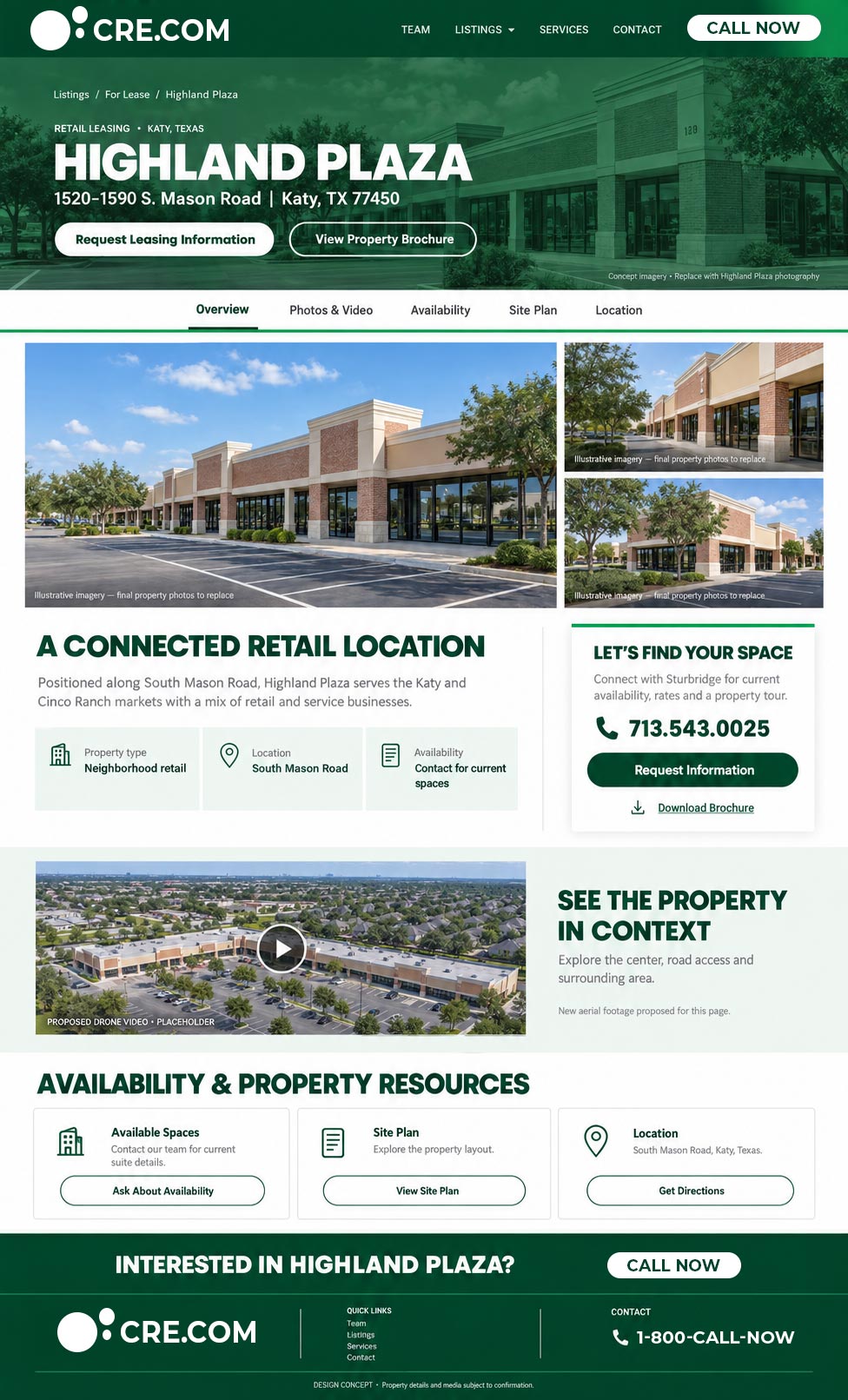
One practical way to create an authoritative digital source is to give individual properties their own pages within the property management company’s existing website. That does not necessarily mean building a separate website or purchasing a separate domain for every property. A structure as simple as:
example.com/properties/property-name
can give each property a permanent, company-controlled destination. Depending on the property, that page might contain:
- Current photography
- Property overview
- Available space
- Amenities
- Maps and location information
- Leasing contacts
- Brochures and downloadable materials
- Floor plans
- Tenant information where appropriate
- Links to external listing platforms
The important distinction is ownership.
Third-party listing platforms remain useful for discovery, but the property manager does not fully control how those platforms are structured, how long a particular listing URL remains active, or what happens when availability changes. A property page hosted within the management company’s own website provides a destination the company can maintain over time.
External listings can point back to it. Leasing brochures can link to it. Email outreach can use it. Search engines can discover it. Future property updates can be made without changing the address people already know.
It also reduces the risk of a management-company website becoming little more than a collection of links to external listings that may eventually move, expire, or break. For management companies overseeing multiple properties, a repeatable property-page structure can become especially useful:
Management Website → Property Portfolio → Individual Property Page → Current Leasing and Property Resources
The page does not need to replace LoopNet, CoStar, broker outreach, or other leasing channels. It gives those channels an authoritative destination to support. And because it lives on an asset the management company controls, it can remain useful even as outside listings and campaigns change.
Not every property will need the same level of digital presence.
For many, a well-structured page inside the management company’s website may be enough. A larger or more complex property may justify a microsite or standalone website. The appropriate solution should follow the needs of the property rather than an arbitrary rule.
Keep the Digital Property Current
A property website can be beautifully designed and still become less useful over time if the information inside it stops reflecting the property.
Commercial properties change. Tenants move. Spaces become available. Leasing contacts change. Renovations are completed. New amenities are added. Photography becomes dated. Floor plans change. Surrounding development changes the context of the location. A brochure that was accurate two years ago may still look perfectly professional while communicating information that is no longer current.
Digital stewardship means creating a process for those changes to make their way into the property’s public-facing resources.
That process can be triggered by meaningful events:
- A tenant moves in or out
- Availability changes
- Contact information changes
- A major property improvement is completed
- New media is produced
- Leasing collateral is updated
- Access or parking changes
- Amenities change
- New maps or floor plans are created
Some properties may also benefit from a periodic review even when nothing obvious has changed. The goal is not constant editing for its own sake. It is making sure the property people encounter online still resembles the property being managed in the real world.
The Digital Presence Can Be Useful After the Lease Is Signed
Property marketing naturally focuses on prospective tenants. But the usefulness of a property’s digital presence does not have to end once someone becomes an existing tenant. Depending on the property, existing tenants may need access to:
- Management contacts
- Maintenance information
- Tenant directories
- Amenity information
- Building updates
- Property maps
- Access information
- Relevant forms
- Event information
- Portal links
- Emergency or operational resources
This does not mean every commercial property needs a custom tenant app or sophisticated portal. Sometimes the opportunity is much simpler. If tenants repeatedly contact management asking where to find the same information, there may be a case for making that information easier to access digitally.
That is where the idea of tenant value becomes especially practical. A useful digital property can reduce small points of friction. It can help tenants answer straightforward questions without searching through old emails or contacting several people.
And when direct communication is necessary, it can make the correct person or process easier to find. IREM includes routine tenant communication, leasing activity, property marketing, and tenant-oriented programs among relevant areas of commercial property-management experience.

Digital Communication Should Support Property Management, Not Replace It
Technology can make property communication more efficient. Tenant-experience platforms can support functions such as maintenance requests, amenity reservations, building information, announcements, and other interactions between tenants and management. BOMA has highlighted digital tools that support communication and property operations while emphasizing the continuing importance of responsive management.
But the tool itself is not the communication strategy. A portal that nobody monitors does not improve communication. An automated message that sends people to outdated information does not improve the tenant experience. A mobile app is not inherently better than a clear email, a useful property page, or a responsive property manager.
Good digital communication should make management more accessible and information easier to understand, not create another barrier between the tenant and the people responsible for the property. Depending on the environment, useful digital communication might include:
- Planned-maintenance updates
- Emergency information
- Access changes
- Amenity closures
- Building announcements
- Event information
- Tenant newsletters
- Contact resources
The technology can vary. The objective is consistent communication.
Give Leasing, Management, and Ownership Assets They Can Reuse
A well-maintained digital property also creates value internally. When approved photography, property facts, maps, contacts, brochures, floor plans, logos, and other resources are current and easy to locate, multiple teams can use them.
A leasing team may need imagery for outreach. Ownership may need a current property photograph for a presentation. Management may need a map for an announcement. A broker may need a current brochure. Someone preparing a social post may need approved property information.
Without an organized source, each of those requests can become a small reconstruction project.
This connects directly to the idea behind a coordinated digital marketing toolkit: good source assets become more valuable when they can support several applications rather than existing as isolated deliverables.
The difference in this article is what happens next. Once the toolkit exists, somebody still has to keep it useful.
The Condition of the Digital Property Communicates Something Too
Physical presentation is easy to recognize. A damaged sign, neglected landscaping, or poorly maintained common area is visible immediately. Digital neglect can be quieter. None of those problems automatically means the property itself is poorly managed. But they can make the property harder to understand and create an online presentation that feels less current than the physical asset deserves.
Where imagery no longer represents the property accurately, updated property photography, video, or digital media may be part of bringing the digital presentation back in line with the physical asset.
Dead links
Broken forms
Outdated photography
Old brochures
Incorrect leasing contacts
Empty property pages
Conflicting availability
Old tenant directories
Missing mobile functionality
Inconsistent branding
PDFs that are difficult to use on a phone
Outdated company address or contact information
7
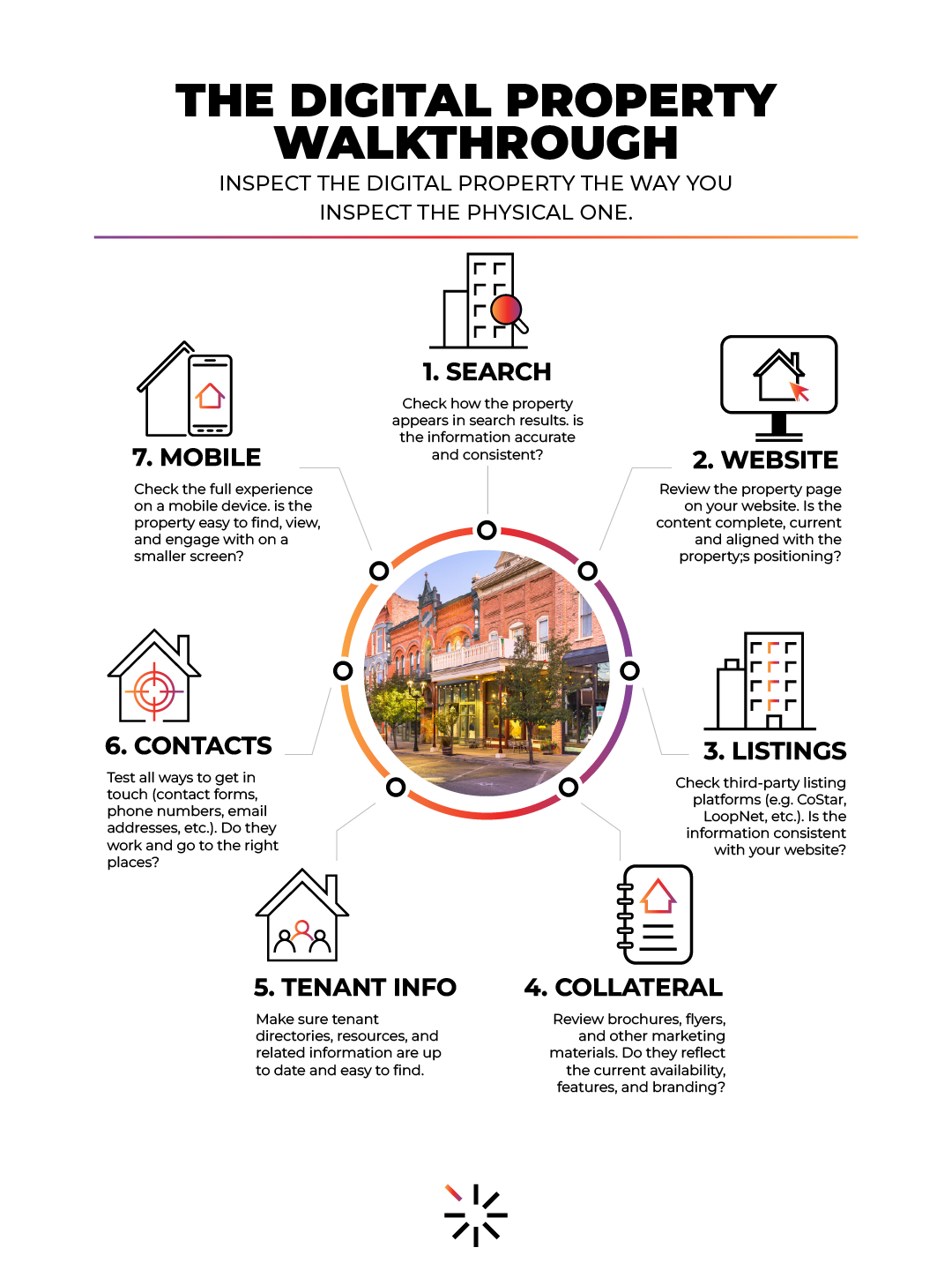
steps to Conduct a Digital Property Walkthrough

Search for the Property—and the Company Managing It
1.
Try and search for the property by property name, address, relevant leasing terms, and major tenants where appropriate. Then search for the property management company itself.
Is the office address current? Does the phone number clearly reach the company? Are contact details consistent across the website and search results? Can someone unfamiliar with the company determine where it is located? Are old locations or outdated contact details still appearing? Are individual property pages easy to find from the management company’s website?
Then look at the property results themselves. Are the images current? Are property descriptions recognizable? Do old listings dominate the results? Are the leasing contacts consistent?
The purpose is to see both the company and property the way someone unfamiliar with them might. A prospective tenant, broker, vendor, owner, or visitor should not have to investigate several sources simply to determine where the management company is located, how to reach someone, or where accurate property information lives. The path from discovery to accurate information should be clear.
Visit the Website
2.
Open the property’s primary web destination and ask:
Is the property information still accurate? Are the photographs current? Are amenities represented correctly? Is availability current? Do downloads work? Are leasing contacts correct? Are maps and directions useful?
If the property is part of a larger management-company website, make sure it is still easy to locate. If there is no dedicated property page, ask whether one would make the rest of the digital system easier to manage.
Review Relevant Listings
3.
Look at the property on the commercial listing platforms where it appears. Compare them against the authoritative property information. Pay particular attention to availability, square footage, contact information, photos, property descriptions, maps, and website links.
The objective is consistency, not identical formatting. Third-party listings may have their own structure, but they should not tell a fundamentally different story.
Compare Leasing Materials
4.
Open the current leasing brochure or property sheet. Compare it with the website and listings.
Are they describing the same property? Do they use current photographs? Do they show the same contact information? Does an old brochure still contain a link to a property page or listing that no longer exists?
If one source is more current than another, determine which information needs to move.
Check Tenant-Facing Information
5.
Where appropriate, review tenant directory, suite information, management contacts, amenities, maintenance resources, building information, useful links, portal access, and property maps.
Try approaching the property as an existing tenant rather than a leasing prospect. Can you quickly find the information you are most likely to need? If the answer is no, consider whether a relatively simple digital resource could remove that friction.
Test the Contact Paths
6.
Do not assume a form works because it is visible. Test leasing inquiry forms, contact forms, phone links, email links, portal links, and maintenance-request links. Call the published number. Listen to the voicemail greeting. Send a test inquiry.
Confirm that the appropriate person actually receives it. A broken or unclear contact path can remain unnoticed for a surprisingly long time if nobody periodically tests it.
Review Everything on a Phone
7.
A property may look perfectly organized on a desktop computer while being considerably harder to use on a mobile device. Check navigation, maps, buttons, contact links, PDFs, forms, tenant information, property pages, and load speed.
Many of these interactions happen while someone is away from a desk—perhaps driving through the area, standing at the property, or looking for contact information while on the move.
The final question is simple: Does the digital property still represent the physical property—and the company managing it—accurately, usefully, and professionally?

Not Every Property Needs the Same Digital System
A small industrial property and a large mixed-use development may have completely different digital requirements. A relatively simple property might be well served by:
- Accurate listing information
- Strong photography
- Current leasing materials
- A useful company-owned property page
- Clear contact information
A more complex office, retail, or mixed-use environment might justify:
- Detailed property website content
- Tenant directories
- Regular updates
- Amenity information
- Maps
- Portal integration
- More sophisticated communication tools
And certain flagship properties may warrant their own dedicated microsite or website. The goal should not be to add technology because it exists. The digital system should reflect the complexity of the property and the needs of the people who interact with it.
Know When the Problem Is Bigger Than an Update
Some digital problems are maintenance problems. A photograph needs replacing. A tenant directory needs updating. A dead link needs fixing. A brochure needs a new leasing contact. Those are relatively straightforward.
Other problems may reveal that the underlying system no longer supports the property well. Warning signs might include:
- Property information is difficult to update
- Nobody knows which files are authoritative
- Individual properties do not have dependable company-controlled destinations
- The website cannot accommodate current property information
- Every update requires rebuilding the same information in several places
- Featured properties rely on external links that frequently change or expire
- The mobile experience is consistently poor
- Tenant resources are difficult to maintain
- Old PDFs function as the primary information system
- Multiple platforms repeatedly fall out of sync
In those situations, the solution may involve more than another round of content updates.
It might require a better property page, a more flexible website, clearer information architecture, stronger asset management, or a more deliberate process for ongoing website management.
The same principle applies here as it does in many digital projects: Understand the problem before choosing the solution.
Managing the Property Includes Managing Its Digital Presence
Property managers already understand stewardship. A commercial property requires ongoing attention because conditions change. Its digital presence is no different.
Prospects need accurate information to evaluate the property. Leasing teams need reliable assets. Ownership benefits from a professional presentation. Existing tenants can benefit from easier access to useful information and clearer communication. And management teams benefit when those resources are organized, current, company-controlled where appropriate, and easier to maintain.
The goal is not to create more digital marketing simply because more channels are available. It is to make sure the property people encounter online remains:
Accurate. Useful. Current. Connected.
That is digital property stewardship.

Thoughtful strategy. Refined execution. Long-term support.
Strengthen the Property’s Digital Presence
If your property’s website, individual property pages, listings, photography, leasing materials, tenant information, or other digital resources have become difficult to keep aligned, Haeresis can help identify where the system could be simplified, updated, or strengthened.
Have a specific website, property page, photography, video, design, or property-marketing project already in mind?